|
Complete Suite of Embedded Web Development ToolsStandalone Tools for Embedded Development
IoT Protocols
Quick Look
|
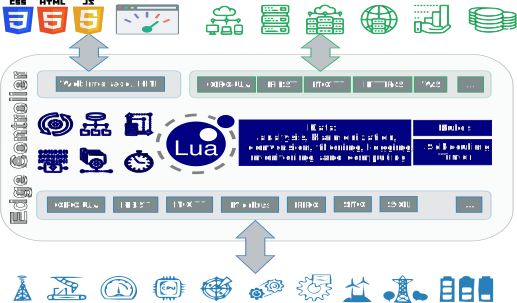
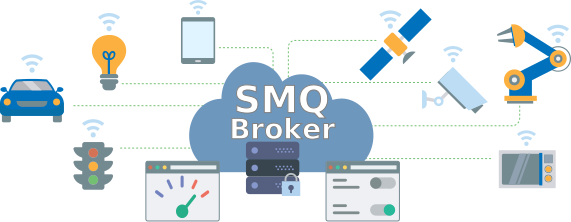
This IoT toolkit enables engineers to craft secure, efficient web and IoT products. With a robust foundation and a versatile array of protocols such as MQTT and OPC-UA, the IoT toolkit adapts from FPGAs and MCUs to cloud server deployment. Simplifying IoT security integration assures innovative yet safe designs, reducing project risks and costs. Your Intelligent IoT, Gateway, & Edge Platform
|
VxWorks, QNX, Zephyr, FreeRTOS+TCP or lwIP, Embedded Linux, INTEGRITY, Windows & Win CE, Azure RTOS, NuttX, Nucleus RTOS, embOS, RTXC, SMX, MQX, RTOS-32, Mac, and UNIX/POSIX.
We guarantee development speed, but also directions, which are so much more important than speed. Some are going nowhere fast.
Create Web/IoT/edge/cloud applications in the high-level Lua language and use LSP for REST, AJAX, & Web-Apps.
Learning a new high-level language is easy; learning a new framework can be time-consuming. Lua APIs are much easier to learn and use than C/C++ APIs, and the time invested in learning Lua is easily gained when you start developing your application. Let Lua help you expedite your development process!
A super fast and small TLS stack and crypto library is included.
Create WebSocket apps using C or Lua.
Easily create secure protocols in Lua.
Why use FTP when you can use your device as a secure network drive.
 MQTT
MQTTEasy to use and secure MQTT client library with SOCKS/HTTPS proxy support. Includes Sparkplug library.
Portfolio of IoT modules designed specifically for performing device management.
Design HTTP/REST clients using Lua or C code.
Easily design any type of web service or interface to existing services.
Perfect for interfacing with legacy applications.
Easy integration with common database products.
Send alarms, logs, and other information as emails.
Design WebSocket Apps and Web Services using C/C++.
A hardcore alternative to Lua Server Pages.
Connect to any industrial product that supports the Modbus protocol.
OPC-UA stack with an easy to use API.
The included SharkTrustX plugin greatly simplifies designing products requiring trusted certificates. It automates managing X.509 server certificates within an organization's private network (Intranet). In addition, SharkTrustX can quickly and easily add remote access capabilities to Barracuda App Server-powered products without complicated and expensive development or VPN solutions. With SharkTrustX, organizations can easily and securely connect their IoT devices to the Internet and other cloud services while also ensuring that all communication is adequately authenticated and encrypted.
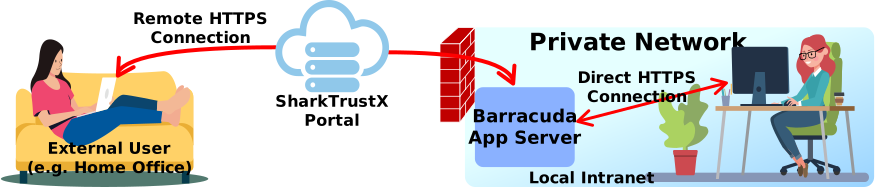
Let your customers experience hassle-free certificate management with SharkTrustX! This advanced solution automates the updating and hot reloading your server's SSL certificate, providing continuous security. Discover more about SharkTrustX's auto certificate management and how it can enhance your product's security.
You can download the Barracuda App Server for evaluation, development, and testing. It is available for various operating systems, including RTOS, Linux, Windows, QNX, and VxWorks. There are also pre-built binaries available for popular hardware platforms. The Barracuda App Server includes a comprehensive set of libraries and tools for building advanced IoT, edge, and industrial automation solutions. It supports many industry standard protocols such as OPC-UA, Modbus, MQTT, and HTTP and includes many features, including support for rapid development using Lua Server Pages (LSP). Whether you are building a standalone device or a cloud-connected solution, the Barracuda App Server can help you get started quickly and easily.
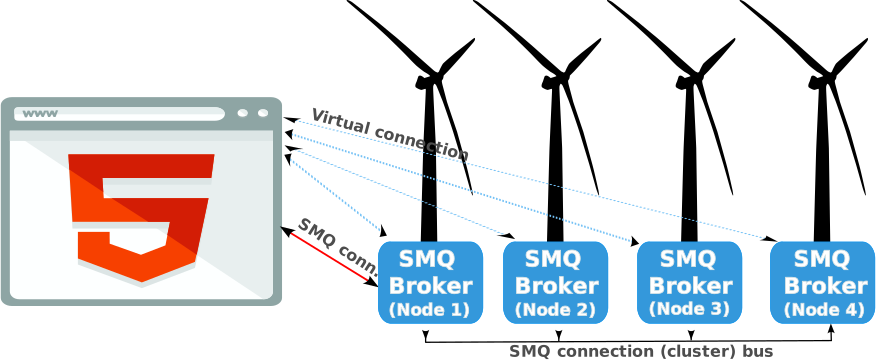
We crafted a complete green IoT solution for car chargers using the Barracuda App Server. In this IoT solution, the Barracuda App Server powers all edge devices and the online cloud portal, simplifying remote charger management.
The Barracuda App Server's unique design enables the server to scale from running on microcontrollers to running on online IoT cloud servers, managing several hundred thousand connections. See the tutorial How To Set Up an Environmentally Friendly IoT Solution for details.
As devices have become far smarter, faster, and reliably connected, so has our desire to take advantage of these advances by adding human interface options for real-time dynamic content manipulation in control, analysis, and the ability to refresh, repair, or replace functional attributes, using server-side logic. See our Web Server vs. Application Server comparison table for more information or check out our list of embedded web server tutorials.